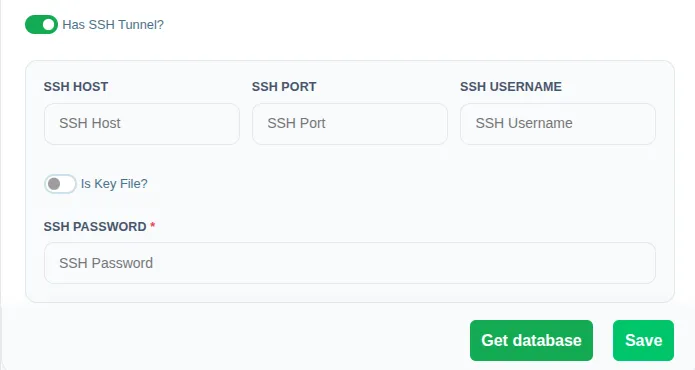
Purpose: Securely connect to databases that are not directly accessible from the internet — for example, databases behind a firewall or within a private network.
Why It’s Used: An SSH Tunnel creates an encrypted connection through an intermediary “jump server” that has access to the target database. Datalytics routes all database queries through this secure tunnel, ensuring data never travels over an unprotected connection.
When to use it: When your database server is hosted on a private network, behind a corporate firewall, or requires an additional layer of security beyond standard database credentials.
How to Configure
Open any database data source (e.g., MongoDB, PostgreSQL, MySQL, MS SQL Server, Oracle, MariaDB).
Toggle Has SSH Tunnel? to ON.
Fill in the following fields:
SSH Host: The IP address or hostname of the SSH jump server.
SSH Port: The port for the SSH connection (default: 22).
SSH Username: Your SSH login username.
Choose an authentication method:
Password: Enter the SSH password directly.
Key File: Toggle Is Key File? to ON and paste your private key content into the Key file Content field.
Click Get database to verify the connection, then click Save.